
Claude SessionKey Helper
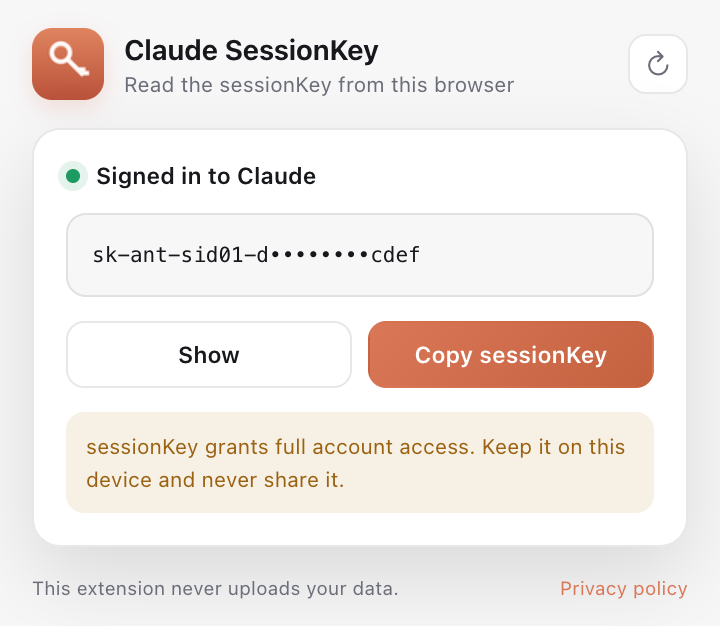
一个只做一件事的 Chrome 扩展:读取你自己浏览器里的
claude.ai sessionKey,点击按钮复制。
不上传、不存储、不分享。
从 Chrome 应用商店安装(推荐)
点击上方「Chrome 应用商店安装」,在打开的页面点「添加至 Chrome」, 然后在浏览器工具栏固定扩展即可。
离线安装(开发者模式)
- 下载并解压
claude-sessionkey-helper.zip。 - Chrome 地址栏打开
chrome://extensions。 - 右上角打开「开发者模式」。
- 点击「加载已解压的扩展程序」,选择解压后的文件夹。
- 登录
claude.ai,点击工具栏中的扩展图标,再点「复制 sessionKey」。
English instructions
The extension is available on the Chrome Web Store — use the button above.
If the store is unavailable, download the ZIP, open chrome://extensions,
enable Developer mode, click “Load unpacked”, and select the unzipped folder.
Sign in to claude.ai, open the extension, and click “Copy sessionKey”.
The extension never uploads or stores your data.
Инструкция на русском
Расширение доступно в Chrome Web Store — используйте кнопку выше.
Если магазин недоступен, скачайте ZIP, откройте chrome://extensions,
включите режим разработчика, нажмите «Загрузить распакованное расширение»
и выберите папку. Войдите в claude.ai, откройте расширение и
нажмите «Копировать sessionKey». Расширение не отправляет и не хранит данные.